Submitted
November 20, 2025
by Dan Delong |
 ShareX - screen capture, modify and share (all-in-one) ShareX - screen capture, modify and share (all-in-one)
Microsoft may have improved the Snipping Tool (Win-Shift-s keys), but insists on placing those screen shots in Pictures/Screenshots/, which may be accessible to One Drive and AI bots. A recent update to Win11 has caused my Snipping Tool window to stay open, on top of all other windows... no X box to close the window. I must use Alt-F4 to close the active window (not a big deal).
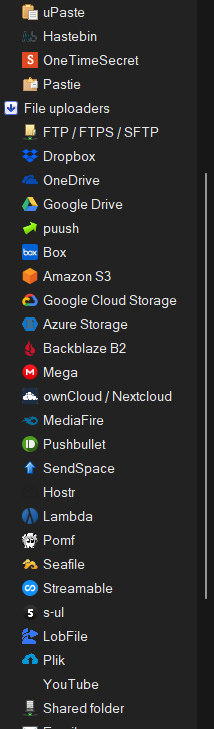
So far, ShareX is free - has been available since 2007. Shots include the mouse pointer (optional), can include a long scrolling web page, and take regularly timed screenshots. The images and be annotated, blurred out areas, saved in many file formats (including GIF for transparency and small file size). Send the results to about 80 services of your choice (e.g. Imgur, Google Drive, Dropbox, or by FTP, to a server.) Also, among those destinations are Lock Screen and Background, along with a URL shortener, a QR code maker, OCR, a hash checker, a metadata editor, and much more. What I did not see in ShareX (although it must be somewhere) is a setting for capturing an irregular area, which is included with the Snipping Tool from Microsoft. |
|
| Figure 1: a few of the many upload destinations |
Download choices are many: - Setup (installer, with over two million downloads), Portable, Dev build (source), Microsoft Store (free for now for those with an account), and Steam (needs an account).
The installer puts files here: - C:\Program Files\ShareX (containing 144 folders and 366 MB).
Upon first run of the program, this problem arose... (likely due to a previously installed grabber - Shotty perhaps).
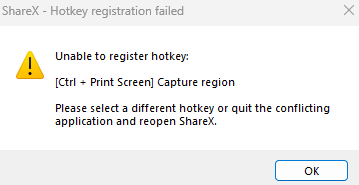

Also indicated, in red, by the first user interface... (see below)
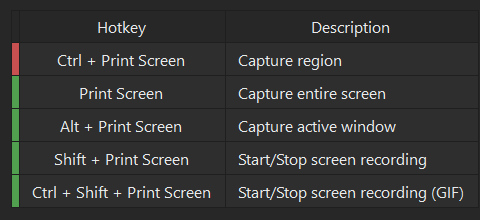
By using the Hotkey settings menu the key combo was changed from Ctrl + Print Screen to Ctrl + c. The colour changed from red to green, indicating no conflicts now exist.
[Except, that was a bad choice, since it is use as the Copy shortcut key combo, so I changed it again to Ctrl + g.]
Screenshots are stored in:- \Documents\ShareX\Screenshots
System requirements:
Platform: Windows
Version: 18.0.1 - 2025 GNU General Public License free
Language: English, German, French, Russian, Turkish, Chinese, Korean, Hungarian, Spanish, Dutch, Portuguese, Vietnamese.
Download Size: 101.67 MB setup, 146 MB for Portable
Installed Size: 366 MB
Licence: FREE donor supported
Rating: 
Download Site here.
|